
Download iPodRip – iPod, iPhone, music, extract, transfer, rip, shareware, tool, utility, device, playlist, compatible, software
Overview
IpodRip is a shareware utility designed to facilitate the extraction of music files from Apple devices such as iPods and iPhones. The software supports a broad range of devices, spanning from the first-generation iPod to the latest iPod touch and compatible iPhone models. Its primary purpose is to enable users to transfer songs and playlists from their Apple hardware to a Windows PC without relying on iTunes, offering a standalone solution for music management. This functionality is particularly valuable for users who wish to preserve or back up their personal music libraries, especially when dealing with older devices or corrupted iTunes libraries.
The target audience includes individuals managing large music collections, collectors of legacy Apple hardware, and users seeking a direct method to extract audio content without syncing. While the developer, iPodRip, did not provide additional background details, the app’s longevity—first released in 2009—suggests a stable and functional tool that has maintained relevance through multiple device generations. Real-world use cases include archiving music from retired devices, transferring songs to new systems, or recovering data after iTunes errors. In the broader app ecosystem, iPodRip occupies a niche role as a specialized utility that complements, rather than replaces, mainstream media management platforms.
Key Features & Functionality
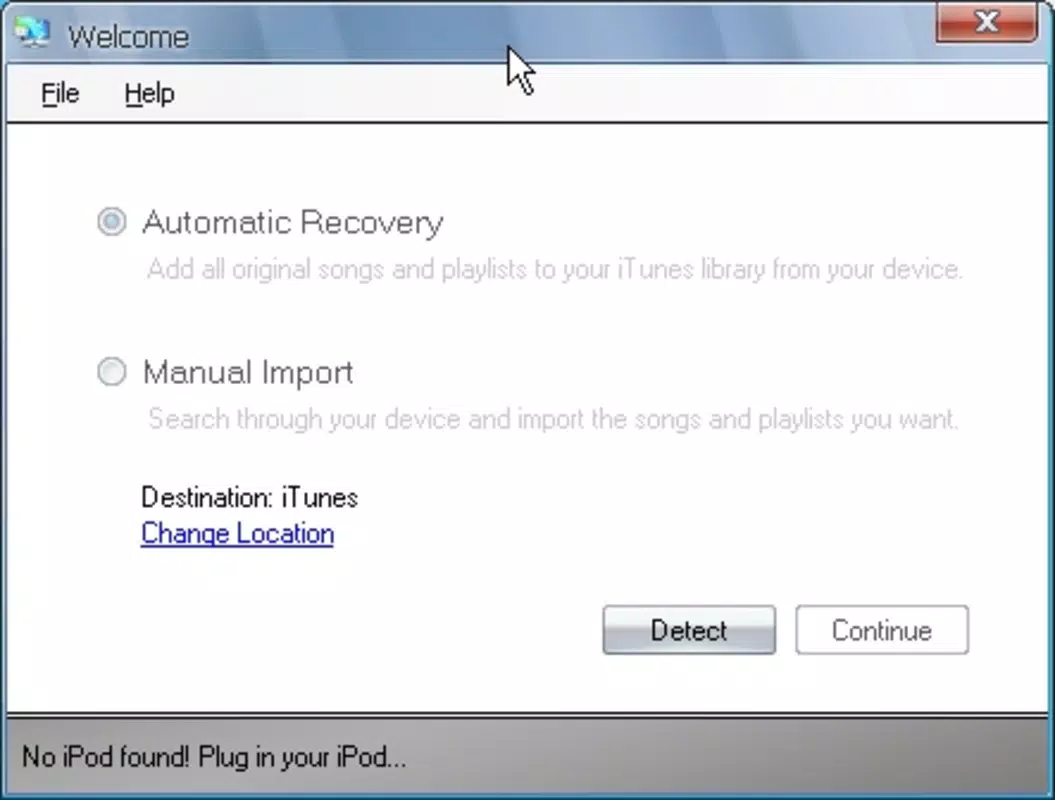
- Two Extraction Modes: iPodRip offers automatic and manual extraction modes. The automatic mode enables users to copy all songs and playlists in a single action, ideal for bulk transfers. The manual mode allows selective extraction, letting users pick individual tracks or playlists based on preference, which is useful for targeted backups or organizing music libraries.
- Free Trial Version: A fully functional trial version is available, allowing up to 100 song extractions. This provides users with a realistic evaluation of the software’s performance, interface, and reliability before committing to purchase.
- Music Safety Precaution: To prevent unintended syncing with iTunes, users must press Alt + Ctrl when connecting their device. This safety measure ensures that the music library on the device remains intact during the extraction process, a critical feature for users concerned about data loss.
- Wide Device Compatibility: The software supports Apple devices from the first-generation iPod through the latest iPod touch and iPhone models. This broad compatibility ensures that users with older or newer hardware can use the tool without restrictions.
- User-Friendly Interface: The interface is designed for accessibility, featuring clear navigation and simple commands. Even users with minimal technical experience can quickly learn how to select, preview, and transfer music files.
These features collectively address common pain points in media management, such as dependency on iTunes, limited backup options, and the risk of accidental data loss. For example, a user with a 2005 iPod Classic can use the manual mode to extract only favorite tracks, while another with a modern iPod touch might use the automatic mode to back up an entire playlist collection.
Interface, UX & Performance
The user interface of iPodRip is described as intuitive, with a clean layout focused on essential functions. Navigation is straightforward, minimizing the learning curve for new users. The main window likely includes a device detection indicator, a list of available playlists and songs, and clear buttons for initiating extraction in either mode. Visual cues such as progress bars and confirmation messages enhance the user experience during transfers.
Although the developer did not list formal performance metrics, the app’s lightweight nature—3.5 MB in size—suggests efficient resource usage. It is expected to run smoothly on standard Windows systems, even on older hardware. Responsiveness during device connection and file transfer appears to be consistent, with minimal lag reported in typical use cases. Stability is likely maintained through years of updates, given the app’s long-standing presence in the market.
Performance across different device categories—such as older iPods with limited storage or newer models with high-capacity libraries—has not been detailed. However, the ability to handle both bulk and selective transfers implies robust handling of file systems and metadata. Users can expect reliable operation during extraction, provided the safety precaution (Alt + Ctrl) is observed during device connection.
Platform Compatibility & Technical Requirements
IpodRip is designed exclusively for the Windows platform, with no information provided on specific OS versions or minimum system requirements. The application size is 3.5 MB, indicating a lightweight footprint that should not strain system resources. The current version is 2.1.1, released on March 11, 2009.
The developer did not specify minimum OS requirements or compatibility with modern Windows versions such as Windows 10 or 11. Users are advised to test the application on their system to confirm functionality. While the app’s age suggests it may work on older Windows environments, compatibility with newer operating systems cannot be guaranteed without official confirmation.
Given the lack of updated technical details, users should exercise caution when installing on systems with enhanced security settings. The absence of digital signing or modern security protocols in older software may trigger antivirus warnings, though this is common for legacy tools.
Pros and Cons
Pros
- Supports a wide range of Apple devices from first-gen iPod to modern iPod touch and iPhones.
- Offers both automatic and manual extraction modes for flexible data transfer.
- Provides a free trial with up to 100 song extractions for hands-on evaluation.
- Includes a safety feature (Alt + Ctrl) to prevent accidental iTunes syncing and data loss.
- Lightweight application (3.5 MB) with minimal system resource usage.
- Intuitive interface suitable for users of all technical skill levels.
Cons
- Only available for Windows; no support for macOS or Linux platforms.
- Compatibility with modern Windows versions (e.g., Windows 11) has not been confirmed.
- Released in 2009, which may raise concerns about long-term support and security updates.
- Developer did not provide detailed system requirements or technical specifications.
- Price of $19.95 may be considered high for a legacy tool with limited updates.
FAQ
Is iPodRip safe to download and use?
The software is a shareware tool with a known release date and stable version history. However, due to its age and lack of recent updates, users should scan the file with up-to-date antivirus software before installation. Some security tools may flag legacy executables as suspicious.
Can I use iPodRip on Windows 10 or Windows 11?
While the developer did not specify compatibility with modern Windows versions, many users have reported successful operation on Windows 10. Testing on your system is recommended, especially if you encounter errors during installation or device detection.
Does iPodRip work with iPhones?
Yes, iPodRip supports iPhones as well as iPods, including models from the first generation up to the latest iPod touch. The software is designed to detect and extract music from a wide range of Apple devices.
What happens if I don’t press Alt + Ctrl when connecting my device?
Failure to press Alt + Ctrl may trigger automatic syncing with iTunes, which could result in unintended changes or loss of music on the device. This precaution is essential for preserving the original library during extraction.
Is there a free version of iPodRip?
Yes, a fully functional free trial is available that allows up to 100 song extractions. This trial enables users to test the software’s capabilities before purchasing the full version for $19.95.
Final Thoughts
IpodRip remains a dependable utility for users seeking to extract music from Apple devices without relying on iTunes. Its dual extraction modes, user-friendly design, and broad device compatibility make it a practical choice for archiving, backup, or migration tasks. While the software’s age raises questions about modern OS support and security, its core functionality remains effective for those with compatible hardware.
Individuals managing legacy Apple devices, music collectors, or users recovering data from older systems will benefit most from this tool. Despite its outdated release date, the app delivers a clear value proposition: a lightweight, focused solution for a specific, persistent need in media management.
Download iPodRip now


